Making My Own AI Agent
I built my own custom LLM agent.
Its name is agi (pronounced agey), which follows a similar naming style to Chappy (チャッピー), the cute nickname ChatGPT gets in Japan. The word agent can be turned into agi by using a similar-sounding ending. I know, silly. Another reason is that this tool actually achieves artificial general intelligence (AGI), but that’s just a secondary reason 😉.
It was written in Go as a CLI (command-line interface), although its main purpose is to run inside other programs via inter-process communication primitives or to be called from scripts. It supports LiteLLM and OpenAI’s API through transport adapters, including compatibility with DeepSeek.
Why Would Anyone Build Their Own Agent?
There are plenty of solutions that achieve the same thing, but mine has a little twist. The use cases for this agent are a bit different from those of most mainstream tools.
Many agent tools are coupled with or integrated into something, such as Meta’s Muse or Gemini inside Google apps. Other agents are GUI or TUI tools that let you provide a prompt and run the whole task from beginning to end. Still other agent tools come in the form of frameworks such as LangGraph, where you need to implement the agent almost from scratch.
My tool follows a slightly different design. It’s meant to follow the UNIX philosophy of processes: crash noisily when there’s an error, pass text streams to the next program in the pipe, and “do one thing and do it well.” Achieving simple and convenient inter-process communication was one of the main objectives of this project. This turns agi into just another tool you can use inside your scripts, similar to using utilities like grep, awk, cURL, etc. The one thing agi tries to do well is to receive a prompt, solve the task (presumably with some external effects), and yield the final answer as text.
This tool is very lightweight and comes with no hidden system prompt bloat. It does come with a built-in default system prompt explaining how to perform generic tasks, but swapping system prompts is a first-class feature, and multiple files containing prefabricated user-defined system prompts can be injected and concatenated to create the final system prompt. It doesn’t even have the concept of a current/working directory (although it does inherit the parent process’s working directory in many cases), so it doesn’t read AGENTS.md by default. Everything is configurable, and no hardcoded prompt forces agi to behave like an agent tailored to a specific kind of task. As a result, this also means that agi doesn’t ship with coding capabilities by default, beyond those that the LLM natively provides through its training. The only caveat is that agi does inject some hardcoded system prompts to explain how to use skills (e.g., how and when to load them) and certain core control-flow tools, such as how to create subagents. These are core native tools, so the system prompt needs to contain some guidance for the LLM to interact with the harness properly.
Since it’s very lightweight and starts up quickly, there’s little friction involved in launching it. And because an agentic run isn’t associated with a current/working directory, you can start one from anywhere without having to choose a dummy or empty directory just to hold the session.
Native Inter-Process Communication Semantics
This is my favorite feature of agi. Inter-process communication is when two or more processes communicate with each other. The most common use case (but not the only one) is when a program spawns another program as its child and communicates with it by passing data via stdin (standard input) and then getting the stdout (standard output) of the child program. A similar case is when a program passes its stdout to the next program in a pipe, which performs some post-processing on the output of the previous program. These communication primitives allow you to compose programs in very complex ways.
TTY Mode vs. Non-TTY Mode
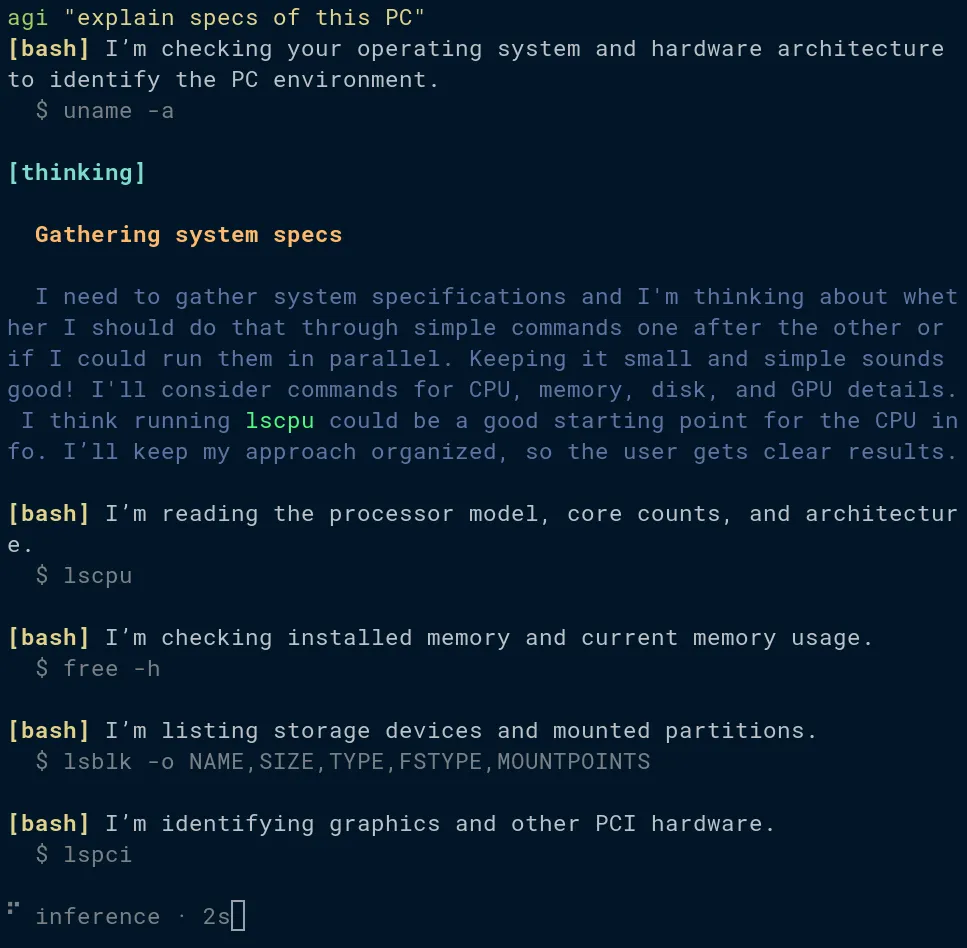
Running a program in a terminal (i.e., in TTY mode) usually means the user (the human behind the keyboard) is the one looking at the output. On the other hand, when a program is running in a pipe or as a child of another program or supervisor, another program is consuming its output (i.e., it’s running in non-TTY mode). The agi program can automatically detect which context it’s running in and change its output accordingly.
Specifically, in TTY mode, all sorts of indicators are shown: which tools are being called; how long inference or tool calls take (e.g., via a spinner with a time display); thinking/reasoning tokens; intermediate assistant messages; and the final answer from the agentic run.
Non-TTY mode, on the other hand, is meant for other programs to consume agi’s output. Therefore, it outputs only the final answer to stdout, without the other information that would otherwise appear.
When you pipe agi to another program, it prints only one final answer, never intermediate reasoning or notifications about tool calls. This makes it easy for the next program to grab that answer as text and continue processing it.
Exit Code: Success or Failure
Since one of the expected use cases is to call agi from inside Bash scripts,
sometimes it’s useful to know whether agi succeeded or failed. You can
achieve this by using the built-in flag --exit-code, which takes a
string explaining the conditions required for success. When this flag is
enabled, the exit code is zero when the task succeeds and 1 when it fails.
If no explanation is provided, agi uses generic guidance. In many cases, though, that alone isn’t enough, so I always try to explain as clearly as possible what success means and what should be considered a failure.
The intended use case is to make agi exit with an error when it detects impossible tasks, such as “prove P=NP” or “guess what I’m thinking right now”. These two examples should return a nonzero exit code when the flag is enabled.
Structured Output
Sometimes it’s necessary to continue the pipe with a program that accepts structured output.
The flag --schema makes the LLM output JSON, with the desired structure
specified via a custom DSL in the CLI arguments.
agi --schema '
  distro:str:"Distribution name",
  kernel:str:"Kernel version",
  cores:int(1..):"CPU cores",
  load:dec(0..):"1-minute load average",
  swap:bool:"Is swap enabled?"
' "Describe this machine" | jq .load
Although some LLM inference providers let you define the desired structure, I decided to
use a custom mechanism. The harness adds artificial messages to the conversation to force the LLM to
output JSON. It then validates the returned answer against the schema and
exits with an error if the number of attempts exceeds a threshold. Afterward, those artificial harness instructions are removed from the
conversation, and only the JSON is printed to stdout. As a result, the
conversation never stores anything related to JSON generation. This is because an execution of the agi command may or may not use the
--schema flag. If we leave messages that mention generating JSON, the LLM
may get confused in a future call and think it must output JSON, even though that specific
execution of agi doesn’t specify the --schema flag. Truncating the messages
after JSON generation is complete creates a “ghost conversation” that gets
discarded, making it seem as though it never happened. Only the user (or
the next program in the pipe) gets the JSON, but agi never stores it
anywhere.
Programmability
Using these inter-process mechanisms discussed so far, it’s very easy to create scripts and wrappers, and include agentic behavior in other programs.
I’ll discuss some examples in the following sections.
Chatbot-Like Semantics
When the agi command is executed, it will create a session, which consists of a directory stored somewhere (you can create an empty directory beforehand and use that one instead). The user prompt is stored as a user-role message. Then the agent will generate assistant-role messages and request the harness to execute tools. Tool requests and assistant messages are interleaved until the task is completed.
If you execute the agi command again with the --session flag and pass
the previously generated directory (or one you created manually), a new
user-role message will be appended, and a new agentic flow (interleaving of
assistant messages and tool requests) will be executed.
This is basically how you can create a chatbot-like experience. In upcoming sections, I explain how agi can be turned into a convenient shell/REPL, so you don’t have to type the same command for each prompt.
You can do this by executing the command multiple times in the terminal or by predefining a set of prompts and calling them in a deterministic order (e.g., from a script).
Here’s an example of such a conversation, in which the predefined interaction always follows the same order and uses the same prompts. Think of this as a scripted questionnaire that allows the LLM to collect context via chain-of-thought. Keep in mind that simply asking more questions isn’t technically the same as using chain-of-thought, though the result is pretty much the same (building up context and prompting the model to reason).
# Download the recipe.
recipe="$(curl -s "https://www.food-recipes.com/$1.php")"

# Wrap agi so it always uses the same conversation session and accumulates
# prompts and LLM responses as context. Also pass a system prompt tailored
# to the task at hand.
agi() {
  command agi --sys ./recipe-evaluator.md --session ./my-recipe-session "$@"
}

# Make the LLM ingest the initial recipe.
agi "analyze and summarize this recipe: $recipe"

# Build up context by asking a sequence of follow-up questions.
# Both the prompt and each LLM response get appended to the conversation as
# context.
agi "is it junk food?"
agi "is it sweet?"
agi "would a baby like it?"
agi "would it hurt a person with diabetes?"

# Get the final answer as JSON.
schema='score:integer(0..100):"Final score"'
final_prompt="Summarize your verdict and give it a score from 0 to 100"
answer="$(agi --schema "$schema" "$final_prompt")"

# Post-process JSON.
echo "$answer" | jq
Another example of how chatbot-like semantics can be exploited is when a prompt is too brief and needs to be expanded into a more detailed breakdown of the task. This often happens when planning real-life projects, especially when you’re trying to accomplish a large task. You may start thinking: What do I need to buy before I start? Do I need to research something? How can I break this goal into smaller, manageable tasks? This kind of self-questioning can redirect your thinking into creating a roadmap for achieving your goals. Similarly, it’s possible to do the same thing with an LLM.
Using a similar wrapper function as before (which conveniently reuses the same conversation), we could do something like this:
# $1 contains the user input (task specification) for this script
agi "understand and summarize this task: $1"

# Force it to reason more (build up more context).
agi "list 10 observations or facts related to this task"

# Create the subtasks and obtain them as JSON.
schema='[task_title:string:"Title of the subtask"]'
subtasks="$(agi --schema "$schema" "split it into a list of subtasks")"

# Reason even more.
agi "create a list of possible issues we could run into"

# Iterate through all the subtasks.
# We extract the step number and task title from each element of the JSON.
jq -r 'to_entries[] | "\(.key + 1)\t\(.value.task_title)"' <<< "$subtasks" | \
while IFS=$'\t' read -r step title; do
    agi "solve subtask $step: $title"
done
Something similar can also be achieved with a custom system prompt that teaches the LLM how to break tasks into subtasks and proceed step by step, but I often prefer to explicitly execute each step by triggering a fresh prompt. This approach can help the LLM avoid skipping steps and ensure that it does everything as instructed. When the whole instruction is defined in a single system prompt, the LLM tends to forget some steps, presumably due to some phenomenon that I’d describe as “context rot”, in which the instructions stop being clear as the use of the context window grows, and the text becomes noisy, making the LLM unable to pay attention to the important bits and determine what to do next reliably.
Some people seem to believe that using reasoning models means you no longer need to use chain-of-thought, but I disagree. Just take a look at the reasoning tokens some models output, and you’ll realize that many of them aren’t very helpful. Sometimes a model reasons for two or three paragraphs but outputs very little of value. Reasoning models can be combined with chain-of-thought just fine, and sometimes you should, but it depends on the model, the task, how much context you want the model to acquire, and what you are trying to achieve. It’s all just context and prompt engineering at the end of the day.
Mostly Deterministic vs. Mostly Non-Deterministic Agentic Workflows
I created agi partly because I’m a bit tired of agentic workflows that try to achieve everything only via LLM reasoning and tool calls. The reason is that these kinds of workflows are actually not very reliable. They produce inaccurate results in many cases and often take a lot longer than a deterministic program.
The main purpose of agi is to be easy to integrate into programs and lightweight enough to call as many times as you want. That way you can have a deterministic program (e.g., a Bash script) and sprinkle agentic/LLM behavior on top, as opposed to having a “program” that’s mainly just a prompt for the agent to execute end-to-end. In general, I use agi inside a program only when the task involves natural language processing, and I avoid it when the task can be done deterministically with another tool.
Lately, I’ve seen some people use LLM agents to execute tasks end-to-end without any deterministic logic, with varying degrees of success, so I’m not necessarily saying this is wrong, but in many cases, this can be very inefficient. This inefficiency is way more significant when the tasks are executed in high-throughput contexts, such as a web platform that needs to process several jobs in parallel or sequentially. Let’s say your platform or website gets a few inquiries per minute and you want to categorize them or filter them. Maybe you want to detect spam, or answer some of them automatically. Or perhaps you have a matching website (e.g., freelance services or real estate property rentals) and you need to do a lot of natural language processing whenever a user posts or updates content. If you try to use a heavier agent like Claude Code, you’ll probably run into cost issues very quickly. You could also try to code your own solution using something like LangGraph, which would probably be the most efficient solution, but that would require some coding. My agent is a middle ground, offering generic, lightweight agentic capabilities, with the trade-off that it isn’t as programmable or flexible as a custom solution built from scratch using LangGraph.
If you still insist on using AI for every task, then I’d recommend you at least vibe-code the deterministic part of the script, which is what I often do anyway.
Other Features
Here are a few other features that are currently implemented, in no particular order:
- Hooks: Claude Code hook scripts are compatible with agi, but agi’s
configuration file has diverged from Claude Code’s, resulting in a custom
format.
For example, while Claude Code uses a syntax such as
"if": "Bash(rm *)", I decided to create my own matchers and filtering syntax, some of which is based on Go’s regular-expression syntax. - Subagents: A typical implementation of subagents, nothing new.
- Skills: Again, based on how Claude Code works.
- User-defined tools: Tools can be defined as executable scripts, written in any programming language. By default, agi is equipped natively with a Bash tool, but in some situations it’s undesirable to give the agent so much access to executing any kind of command. In such scenarios you can disable Bash, and instead grant your agent access to a constrained set of tools with controlled access to read and/or write operations.
- Native file-related tools: Tools for editing and writing files, as well as creating temporary directories.
- PTY (pseudo-terminals): A terminal emulator tool is shipped with agi as a Bash counterpart for situations where the task requires a long-running terminal. In some cases, agi may skip this tool and instead use the script tool or tmux to achieve the same thing.
For now, permissions haven’t been implemented because I think some permission-related functionality can be handled using hooks, and because permissions aren’t a high-priority task right now. MCP support is in the same boat for now, but maybe I’ll implement it if I find an integration worth having that doesn’t already have a CLI or API.
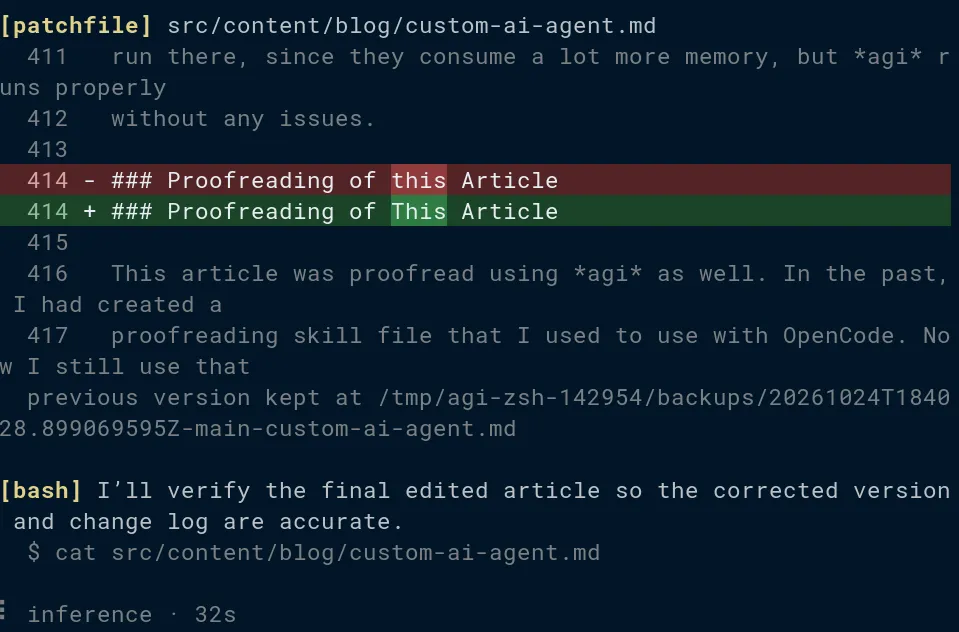
Logging and traceability have been implemented extensively. It’s possible to see everything the agent is doing: which tools are being called, what each tool returns, and when the API is queried and what payload is sent.
As a side note, trying to mimic Claude Code’s behavior was the one thing that
introduced many potential bugs into agi, even though I think I’ve already
fixed them all (I hope). Claude Code’s hook specifications make little or no
sense to me. For example, you can match a hook by using a string like
Edit(**/src/**). At first glance, this might look like a pattern for matching certain paths.
However, this syntax doesn’t work for user-defined tools with multiple
parameters, especially those with named parameters. For some reason, matchers
in Claude Code expect only one parameter, even though Edit itself has more
than one, including the content to write.
Another ridiculous example is the way Bash (or any user-defined tool) hooks work. Bash hooks expect you to pass the input as two individual strings: stdout and stderr. On the other hand, when you pass the tool’s result to the LLM, the LLM in most cases expects both strings to be interleaved in the same way they appear in a pseudo-terminal. This is because LLMs are presumably trained on outputs interleaved as they naturally appear in pseudo-terminals, rather than on outputs split into two streams. Furthermore, the hook should be able to replace or modify each stream individually. But even if we preserve the timestamp of each line in each stream to maintain the interleaving, arbitrary modifications made by the hook could still mess up the ordering, especially if lines are removed or added. These three requirements are difficult to reconcile with each other.
This is why, although I initially tried to mimic Claude Code’s behavior to make agi as compatible as possible, I had to diverge from it: much of Claude Code’s behavior makes no sense to me. To be fair, Claude Code’s documentation doesn’t even explain a lot of these things, so I might be misunderstanding some things. For most non-adversarial use cases, hook scripts that work in Claude Code are also compatible with agi and behave identically. However, there are presumably a few uncommon edge cases where they differ slightly.
Working Use Cases
Here are some working use cases I have right now:
Social Event Evaluator
A script that scrapes a popular website that advertises social events in Japan. The scraping is fully deterministic; only the evaluation of the events relies on agi and natural language processing. The best events, as determined by the criteria in my prompt, are sent to me via my Telegram bot.
Previously, I did this entirely by relying on a prompt passed to agi, which was expected to complete the task end-to-end. After revamping this workflow into a deterministic script that uses agi only for the evaluation part, the number of tokens used was reduced by a factor of about 300. This is not surprising, considering scraping uses a lot of tokens, especially if the LLM has to reason about the HTML structure each time it executes the task from scratch. Now the full program uses sqlite3, jq, cURL, Bash, Python, and other tools for the deterministic parts.
REPL Wrapper
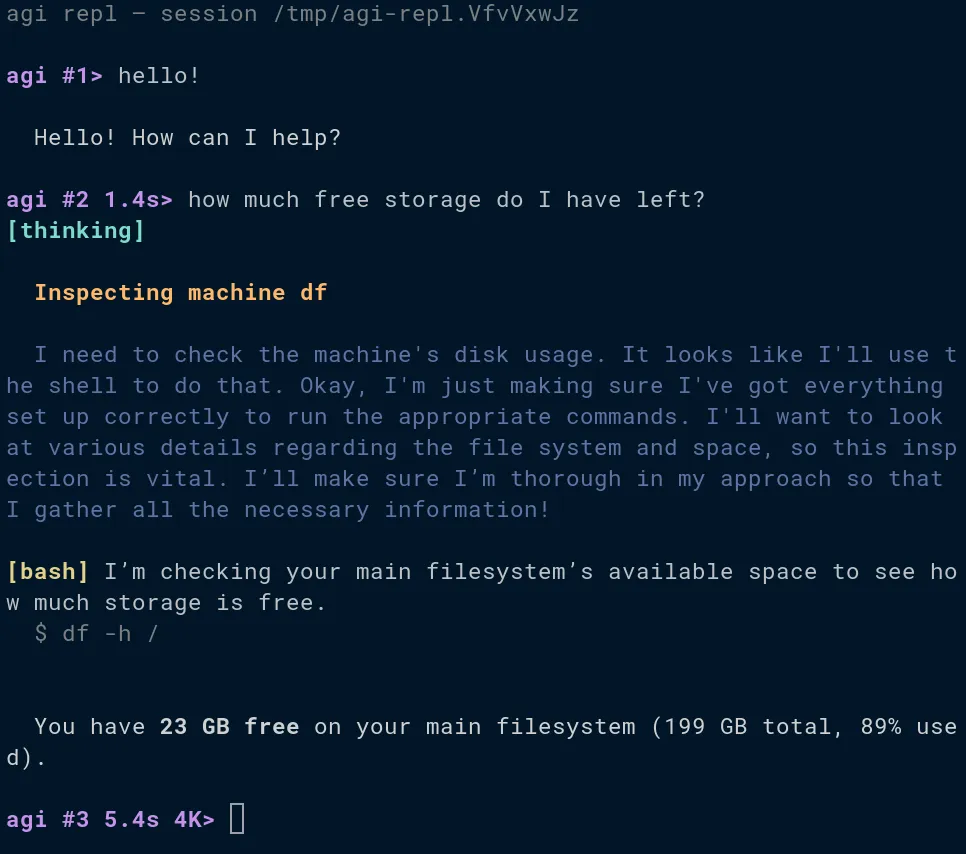
The main way to achieve a chatbot-like feel when using agi is by passing the
--session flag each time you want to continue a conversation. However, this
can be automated by wrapping agi in an external program that turns it into
a shell or
REPL.
This doesn’t add any new functionality, but makes it easier to use in a
terminal.
PC Maintenance and Miscellaneous Tasks
Examples include cleaning up unused software packages, installing difficult-to-install software (e.g., building it from source or resolving missing-library issues), configuring my firewall, and compressing files (I often forget the commands).
I also deployed agi on my small DigitalOcean server (Ubuntu Server) to do maintenance tasks. Since I use Arch Linux, I often forget details about Ubuntu, so I end up telling the agent to handle tasks for me. The social event scraper I explained earlier also runs on this server. Interestingly, my server is so small that OpenCode or Claude Code could never run there, since they consume a lot more memory, but agi runs properly without any issues.
Proofreading of This Article
This article was proofread using agi as well. In the past, I had created a proofreading skill file that I used to use with OpenCode. Now I still use that skill but with agi instead.
Neovim Integration
I created a custom Neovim plugin written in Lua that works similarly to GitHub Copilot. I prefer OpenCode or other tools for AI coding, so I decided to keep it simple, without implementing features like chats or prompt windows. I mostly use this integration for smaller tasks like refactoring small portions of code or implementing a function by writing a comment or its signature as a starting point.
Conclusion
Creating this product was an interesting experience, and I learned more about harness, prompt, and context engineering.
I find it pretty cool that I use this tool a lot in my daily life, rather than letting it remain just a portfolio project.